Why "Best AI Writing Tool" Is the Wrong Question to Start With
Every week, someone posts a comparison of AI writing tools ranked by a single quality score. Every week, that ranking misleads more beginners than it helps. The problem is not the scores themselves. It's that the question being answered is too broad to be useful.
Asking "which AI writing tool is best?" is roughly equivalent to asking "which vehicle is best?" before you've said whether you need to carry a sofa, commute two miles, or tow a boat. The answer depends entirely on what the work actually looks like. Before you evaluate any tool, you need to know which tier of the market matches your actual task, and the three tiers serve genuinely different jobs.
Tier 1 — Frontier Assistants: When Quality and Reasoning Beat Everything Else
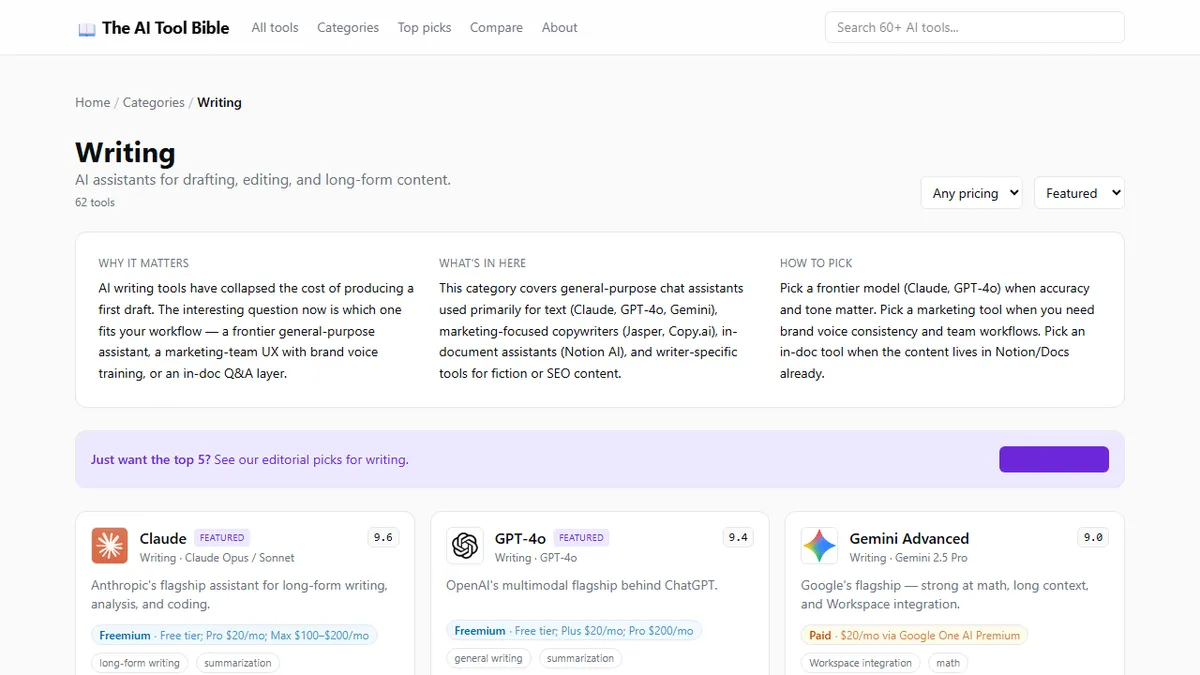
The first tier covers general-purpose models: Claude, GPT-4o, and Gemini Advanced. These tools are built around large language models with no domain specialisation. They handle any writing task you throw at them, from a legal memo to a product description, from a short story to a technical explainer.
Their shared strengths are quality of reasoning, tone flexibility, and the ability to follow complex instructions without much hand-holding. Claude is particularly strong on long documents and nuanced editorial work. GPT-4o handles voice, images, and text in a single interface. Gemini Advanced earns its place when the work lives inside Google Workspace and needs to pull context from your own Docs and Drive.
Pricing for all three sits at roughly USD 20 per month for the main paid tier, a figure low enough that the cost-benefit calculation is almost never the deciding factor. The question at this tier is which model handles your specific task type best, not whether you can afford it.
When should you pick a frontier model? When the writing requires accuracy, original reasoning, or stylistic nuance. Research summaries, editorial drafts, complex explanations, and long-form content all benefit from frontier-tier quality. The full breakdown of AI writing tool categories and scores shows exactly where each model's editorial strengths land.
Tier 2 — Marketing Platforms: When Brand Voice and Team Workflows Matter
The second tier includes tools like Jasper, Copy.ai, and Writesonic. These are not frontier models with marketing features bolted on. They are purpose-built platforms designed around the operational reality of content marketing teams.
The defining features at this tier are brand voice training (you teach the tool your company's tone and vocabulary), team workspaces with shared output libraries, workflow templates for specific content formats (email sequences, product pages, social ads), and integration with CMSs and ad platforms that a frontier model lacks.
The models powering these platforms are often the same ones as Tier 1 (they call GPT-4o or Claude at the backend), but the interface organises the work around campaign production rather than open-ended conversation. That scaffolding is valuable if you are producing 500 product descriptions a month with brand voice requirements. It is unnecessary overhead if you are writing occasional blog posts.
Marketing platforms typically cost between USD 40 and USD 125 per month per seat, which is three to six times the frontier model cost. That premium is only justified when the workflow and template features save equivalent time.
Tier 3 — In-Document Assistants: When Your Content Already Lives Somewhere
The third tier is represented most clearly by Notion AI, which works inside the tool where your content already lives. The defining characteristic here is contextual proximity: the AI has direct access to the document, the project wiki, the meeting notes, and the content that surrounds the thing you are editing.
Notion AI can draft, summarise, rewrite, and translate without you needing to copy-paste context into a separate chat window. The integration removes friction. For teams already running their operations in Notion, this convenience is worth real productivity — not because the underlying model is better than Tier 1, but because the context is always there.
This tier works best when the friction of context-switching is the main obstacle. If your writing problem is that you keep forgetting to pull relevant context into your AI prompt, an in-document assistant solves it elegantly.
A Five-Question Flowchart for Choosing the Right Tier
Before evaluating any specific tool, answer these five questions honestly:
One. Do you need the AI to produce writing for commercial distribution, or primarily for internal use? Commercial work under your name demands frontier-tier accuracy.
Two. Are you working alone or coordinating writing across a team of three or more people? Team coordination benefits from Tier 2's shared workspaces.
Three. Does your work require consistent brand voice across multiple writers and months of content? Brand voice training is a Tier 2 differentiator.
Four. Does the content you are editing already live in Notion, Google Docs, or another platform with an AI layer? If yes, try the in-document tier before paying separately.
Five. Is your primary constraint speed of first draft production, or quality of final output? Speed at volume points toward Tier 2 templates; quality at moderate volume points toward Tier 1.
If your answers point to Tier 1, start with the free tier of Claude or GPT-4o before paying anything. Both offer enough free usage to confirm whether the quality meets your needs.
The One Mistake Beginners Make: Paying for Tier 2 When They Only Need Tier 1
The most consistent beginner error in AI writing tools is buying a marketing platform when a frontier model would have handled everything needed for a fraction of the price. This mistake happens for understandable reasons: Tier 2 platforms are marketed aggressively, the case studies show impressive volume outputs, and the templates feel reassuringly structured when you are new to AI writing.
But for an individual writer, blogger, consultant, or small business without a content team, the workflow features of Jasper or Writesonic are overhead rather than value. You are paying for team permissions you do not have a team to fill, brand voice libraries you will configure once and never refine, and an interface whose complexity exists to manage a content operation you do not run.
The practical advice is simple: spend one month with a frontier model at the USD 20 tier. If you hit a genuine ceiling that Tier 2 would address, you will know exactly what that ceiling is, and the upgrade decision becomes obvious rather than speculative.