The Fundamental Difference: AI-First IDE vs AI-Augmented IDE
The clearest way to frame this comparison is as a philosophical one before it is a feature one. Cursor was designed from the ground up as an editor where AI is the primary interface: every interaction, every keyboard shortcut, every panel is oriented around the assumption that you will be in constant conversation with the model. GitHub Copilot was grafted onto an existing ecosystem: it is an extension that augments VS Code, JetBrains, and other editors without asking you to change where or how you work.
That architectural difference matters more than any individual feature comparison. Cursor is a context switch. You are adopting a new environment. Copilot is an upgrade to the environment you already use. Both approaches have genuine merits, and the right choice depends less on which tool is "better" than on what kind of developer you are.
Where Cursor Wins: Multi-File Edits, Composer, and Model Flexibility
Cursor's most meaningful advantage over Copilot today is the Composer agent: the ability to give a natural-language instruction that spans multiple files, reads your codebase, and applies a set of coherent edits across it. This is not tab-completion; it is something closer to pair programming where the AI holds context about your entire project structure.
For refactors that touch many files simultaneously, or for building out a feature from scratch across a component hierarchy, Composer produces a meaningfully different experience than anything Copilot currently offers in its standard configuration. You describe the change; the editor applies it; you review a diff.
Cursor also gives you explicit model choice at the moment of use. You can route a tab-completion request to a fast, cheap model and a complex architectural question to Claude Sonnet or GPT-4o, all within the same session. Copilot's model options have expanded, but the interface buries the choice.
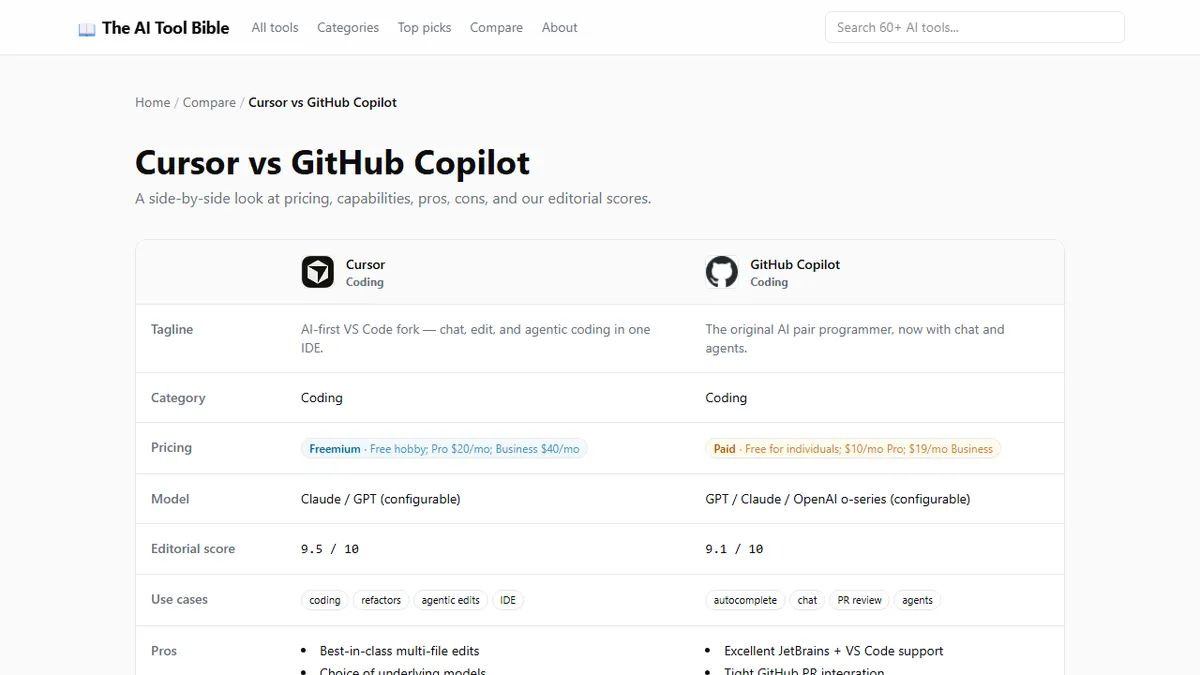
The side-by-side scoring of Cursor and GitHub Copilot captures these distinctions across capability dimensions if you want a structured breakdown.
Where Copilot Wins: JetBrains, Enterprise SSO, and Zero Context-Switch Cost
Copilot's strongest argument is that it works where you already are. If your team uses JetBrains IDEs (IntelliJ, PyCharm, WebStorm), Cursor is simply not an option in the same form. Copilot has mature, production-grade extensions for the full JetBrains suite, and the quality of suggestions in those environments has improved significantly over the past year.
For enterprise teams, Copilot's authentication story is also materially cleaner. SSO integration, audit logging, policy controls, and GitHub Business billing are all in place. Setting up Cursor across a team of 50 engineers involves more administrative friction, and the enterprise tier has fewer controls around data handling and model selection policies.
Perhaps most practically: engineers who are already fast and comfortable in VS Code can install Copilot in under two minutes and be productive immediately. Nobody needs to relearn anything. For developers with tight deadlines and no tolerance for productivity dips during tooling transitions, that matters.
Tab Completion Head-to-Head: Speed and False Positives
For the most common daily interaction (single-line and multi-line autocomplete), both tools are genuinely good, and the gap has narrowed significantly over the past year. A few practical observations based on regular use of both:
Cursor's completions are marginally more context-aware on complex function signatures where the surrounding file provides important type information. Copilot's completions are slightly faster to appear — the latency difference is noticeable on older hardware.
Where they diverge more clearly is in false-positive rate: suggestions that look plausible but introduce a subtle bug or incorrect assumption. Both tools have this problem; it is inherent to the approach. Cursor's longer context window means it can draw on more of your file when generating, which tends to reduce (but not eliminate) those mismatches.
Neither tool has solved the problem of over-confident suggestions in domains where the model has limited training coverage. Security-sensitive code, obscure library APIs, and domain-specific logic all require the same level of human review regardless of which AI generated them.
Pricing Reality Check: What You Actually Get
As of 2026, both tools cost approximately USD 19-20 per month for the main individual tier: Cursor Pro at USD 20 and GitHub Copilot Individual at USD 19. The pricing parity is close enough that cost alone should not be the deciding factor for any individual engineer.
Where the comparison shifts is at the team and enterprise level. GitHub Copilot Business at USD 19 per seat per month integrates with GitHub's existing billing and policy management, relevant for organisations already paying for GitHub Enterprise. Cursor's team offering provides similar per-seat pricing but without the GitHub audit trail and compliance tooling that enterprise procurement teams often require.
Who Should Switch and Who Should Stay
Switch to Cursor if: you work in VS Code today, your projects regularly involve multi-file refactors or greenfield feature development, you want the freedom to choose your model per task, and you are willing to spend a week relearning keyboard shortcuts and panel layouts.
Stay with Copilot if: your team uses JetBrains, your organisation requires enterprise SSO and audit controls, you are in a production-critical environment where tooling stability matters more than capability ceiling, or you simply want AI assistance without disrupting a workflow that already works well.
The honest verdict is that neither tool is objectively superior for every engineer. The Cursor advocate who tells you Copilot is obsolete and the Copilot advocate who calls Cursor overkill are both describing their specific working style more than they are describing the tools.